Anna V: Presets
Overview
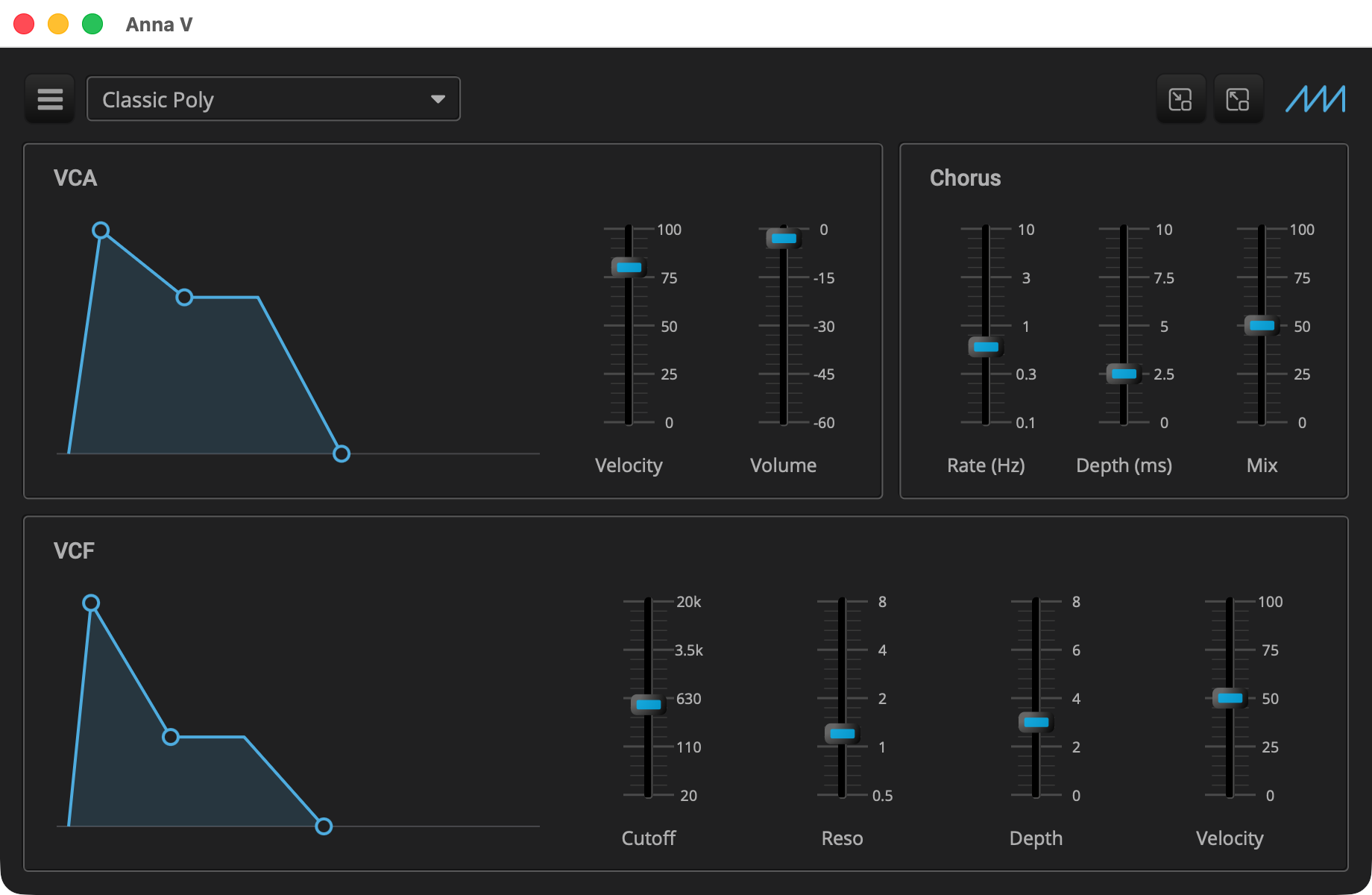
Stage 5 is the finished instrument. It adds the standard header along the top of the editor, with the preset menu, the zoom buttons and a logo, and eleven factory presets that ship with the plugin: Classic Poly, Brass, Soft Pad, Pluck, Fat Bass, Acid, Strings, Organ, Lead, Clav and Sweep. The sound and the controls are stage 4’s.
|
Read Anna IV: Drawn Envelopes first, and the tutorials before it. This page
covers only what stage 5 adds; the listings are the parts of stage 5’s
files that are new or changed, and the rest is stage 4’s. Each
listing’s title links to its whole file, and all of stage 5 is in
|
Presets need no code in the plugin. The controller base loads, saves and deletes them, and the header lists them in its menu. The plugin supplies a file of factory presets and one call that puts the header on the panel, and it may give the header a logo.
Quick Start
As in Anna I: The Voice, with anna_5 in place of anna_1.
On macOS and Linux:
Q=/path/to/q
cp -R "$Q/example/q_plug/anna_5" /tmp/anna_5
cd /tmp/anna_5
cmake -B build -G Ninja -DCMAKE_BUILD_TYPE=Debug -DQ_ROOT="$Q"
cmake --build build
On Windows, in a command prompt with the MSVC environment loaded:
set Q=C:\path\to\q
xcopy /E /I "%Q%\example\q_plug\anna_5" "%TEMP%\anna_5"
cd /d "%TEMP%\anna_5"
cmake -B build -G Ninja -DCMAKE_BUILD_TYPE=Debug -DQ_ROOT="%Q%"
cmake --build build
Then start the standalone app:
-
macOS:
open "build/products/Anna V.app" -
Linux:
"build/products/Anna V" -
Windows:
"build\products\Standalone-q_plug-anna-5_standalone\Anna V.exe"
Pick a preset from the header’s preset menu and play.
The Factory Presets
factory_presets.json is one JSON object that maps each preset’s name
to its state, in the form the controller saves a state in:
{
   "Classic Poly": { (1)
      "plugin": "com.qplug.anna_5", (2)
      "version": 2, (3)
      "params": [
         {
            "id": 1, (4)
            "name": "Attack",
            "value": 0.01 (5)
         },
         ...
         {
            "id": 6, (6)
            "name": "Cutoff",
            "value": 500.0
         },
         ...
      ]
   },
   ...
}| 1 | The preset’s name, as the menu lists it. The menu keeps the file’s order. |
| 2 | The plugin the state belongs to, its plugin_info id. |
| 3 | The state version, from plugin_info. It has been 2 since stage 1
(see Anna I: The Voice). |
| 4 | Each parameter is identified by its id. The name is only for people reading the file. |
| 5 | Values are in the parameter’s own units: seconds for a time, hertz for the cutoff, percent for a sustain level, decibels for the volume. The attack here is 10 ms. |
| 6 | Stage 2’s filter, at ids 6 to 12, and after it the velocities, the chorus and the volume, seventeen parameters in all. |
|
In depth: Presets, in controller, for where each file is kept and how the header marks a preset as edited. |
The Presenter
      fixed_size({920, 568}, (1)
         margin({10, 10, 10, 10},
            vtile(
               // Inset as the panels are, so its ends line up with theirs
hmargin({6, 6}, hold(make_header())), (2)| 1 | The panel grows to 920 by 568, and plugin_info gives the same size. |
| 2 | make_header, which the presenter base provides, builds the
standard header, and it goes at the top of the content. Each panel below
it has a 6 point margin, so the header gets the same margin at its sides,
and its ends line up with the panels'. |
The header puts a logo at its far right when the presenter supplies one.
The base’s logo returns null, so by default there is none. Anna’s is a
small sawtooth, the wave the synth starts from, and
anna_presenter.hpp declares the override:
anna_presenter::element_ptr anna_presenter::logo()
{
   return share(image{"logo.png", 0.25f}); (1)
}| 1 | An Elements image, drawn at a quarter of its pixel size: the
picture has four pixels per point, so it stays sharp on high density
displays and when the editor is zoomed. Like Gain’s fader thumb, it is a
resource, which the build copies beside the plugin (see The Build). |
gen_logo.py, in the example’s folder, generates resources/logo.png.
Run it again only to change how the logo looks.
The Build
The factory presets and the logo are resources, copied beside the plugin with the fonts:
q_plug_add_resources(q_plug-anna-5
   "${CMAKE_CURRENT_SOURCE_DIR}/factory_presets.json" (1)
"${CMAKE_CURRENT_SOURCE_DIR}/resources/logo.png")| 1 | The controller reads factory_presets.json from the plugin’s
resources, where this call puts it, and the editor loads logo.png from
the same place. q_plug_add_resources also relinks the plugin when a
named file changes, so an edit to the presets reaches the next build. |
anna.cpp changes the id, the name, the description and the view
size, and the AudioUnit subtype is QAn5.
Components Used
| Component | Role |
|---|---|
Loads, saves and deletes the presets |
|
The preset menu, the zoom buttons and the logo |
|
Zooming the panel |
|
|
The logo, from |
Previous: Anna IV: Drawn Envelopes | Next: Dexter: Full Featured DX7 Synth