Anna IV: Drawn Envelopes
Overview
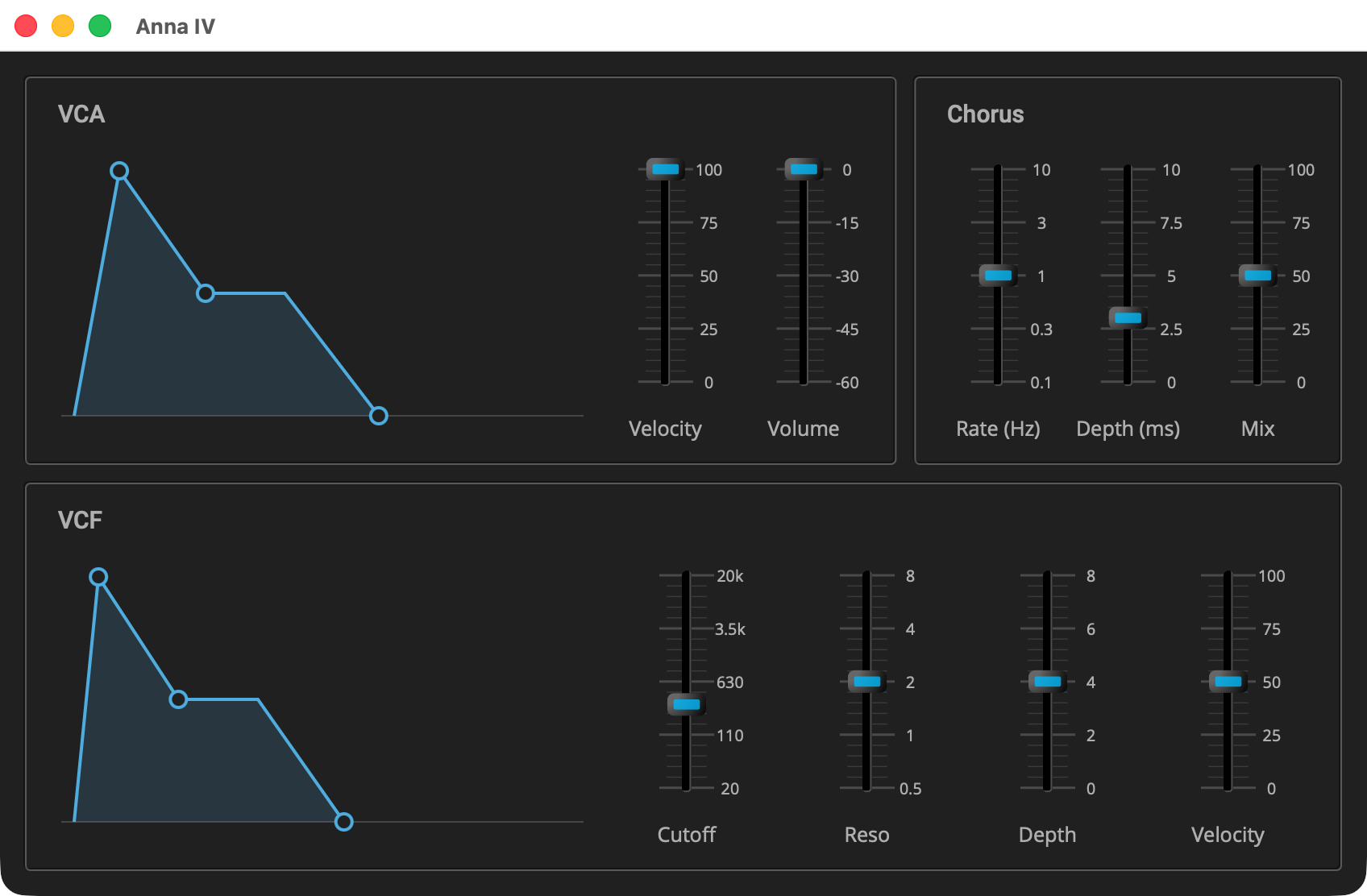
Stage 4 changes no sound. It replaces the eight envelope sliders with two
envelopes drawn as their own shapes, one for the VCA and one for the VCF,
each set by dragging its corners. Each envelope is an Elements
curve_editor, a control of points the user drags, given the points and
the rules for moving them. A slider carries one value; an envelope
carries four. This page shows how one control is bound to four
parameters.
|
Read Anna III: The Chorus first, and the tutorials before it. This page
covers only what stage 4 adds; the listings are the parts of stage 4’s
files that are new or changed, and the rest is stage 3’s. Each
listing’s title links to its whole file, and all of stage 4 is in
|
Quick Start
As in Anna I: The Voice, with anna_4 in place of anna_1.
On macOS and Linux:
Q=/path/to/q
cp -R "$Q/example/q_plug/anna_4" /tmp/anna_4
cd /tmp/anna_4
cmake -B build -G Ninja -DCMAKE_BUILD_TYPE=Debug -DQ_ROOT="$Q"
cmake --build build
On Windows, in a command prompt with the MSVC environment loaded:
set Q=C:\path\to\q
xcopy /E /I "%Q%\example\q_plug\anna_4" "%TEMP%\anna_4"
cd /d "%TEMP%\anna_4"
cmake -B build -G Ninja -DCMAKE_BUILD_TYPE=Debug -DQ_ROOT="%Q%"
cmake --build build
Then start the standalone app:
-
macOS:
open "build/products/Anna IV.app" -
Linux:
"build/products/Anna IV" -
Windows:
"build\products\Standalone-q_plug-anna-4_standalone\Anna IV.exe"
Where the app takes its audio and MIDI from, and how to change it, is in The Standalone App.
The Envelope
#include <q_plug/parameter.hpp>
#include <elements.hpp>
...
namespace adsr
{
   constexpr std::size_t peak = 1; (1)
   constexpr std::size_t corner = 2;
   constexpr std::size_t plateau = 3;
   constexpr std::size_t finish = 4;

   constexpr float stage_width = 0.28f; (2)
   constexpr float plateau_width = 0.16f;

   struct stage (3)
   {
      double         position(double v) const;
      double         value(double pos) const;

      q_plug::parameter const* param;
   };

   std::shared_ptr<elements::basic_curve_editor> make(); (4)
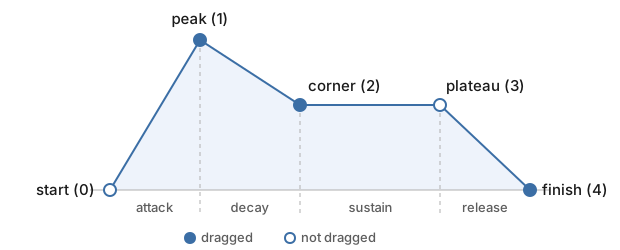
}| 1 | The points of the shape, by index:
|
| 2 | Attack, decay and release each get a share of the width,
stage_width. A long attack moves the peak right without changing the
shape after it, and all three at their longest still fit. The plateau
has a fixed width: a sustain has no length of its own; it lasts as long
as the key is down. |
| 3 | A mapping for the binder: a time parameter’s travel, 0 to 1, as a share of its stage’s width, and back. |
| 4 | Makes the editor: its points, where they may go, and its colors. |
#include "adsr_control.hpp"
...
      std::vector<curve_point> points() (1)
      {
         return {
            {{0.0f, 0.0f}}
          , {{0.2f * stage_width, 1.0f}, true}
          , {{0.3f * stage_width, 0.6f}, true}
          , {{plateau_width, 0.6f}, true}
          , {{0.3f * stage_width, 0.0f}, true}
         };
      }

      point constrain( (2)
         basic_curve_editor::points_type const& pts, std::size_t i, point to)
      {
         to = in_unit_square(to);
         if (i > 0)
            to.x = std::clamp(to.x, pts[i - 1].x, pts[i - 1].x + stage_width);
         if (i == peak)
            to.y = 1.0f;
         else if (i == finish)
            to.y = 0.0f;
         return to;
      }

      bool movable(std::size_t i) (3)
      {
         return i == peak || i == corner || i == finish;
      }
   ...
   double stage::position(double v) const (4)
   {
      return param->position(v) * stage_width;
   }
   ...
   std::shared_ptr<basic_curve_editor> make()
   {
      curve_lines lines{line_color, fill_color}; (5)
      lines.floor_color = grid_color;
      auto e = share(curve_editor(points(), std::move(lines)
       , curve_handle{line_color, panel_color}));
      e->constrain = constrain; (6)
      e->movable = movable;
      return e;
}| 1 | The five points of the figure above, in a unit square: x runs from
0 to 1 left to right, and y from 0 to 1 bottom to top. Each is a
curve_point: a position, then offset_x. The true on every point
after the start sets offset_x, so the point’s x is an offset from the x
of the point before it, not a place in the square. That offset is the
stage’s time, so dragging the peak to the right lengthens the attack and
moves every point after it along, keeping the decay, sustain and release
as they were. These are only starting values; the bindings set every
point from its parameter when the editor opens. |
| 2 | constrain sets the rules for dragging. Each time the mouse moves
during a drag, the editor calls it with the positions of all the points,
the index of the point being dragged, and the position under the mouse.
It returns the position the point moves to. All of these are places in
the unit square, with the offsets already added up, and the editor turns
the returned position back into an offset before storing it. Here there
are three rules:
|
| 3 | movable sets which points the user can drag: the peak, the corner
and the finish. The start and the plateau get no handle and cannot be
dragged. The start is always at zero, and the plateau’s height is bound
to the same sustain parameter as the corner, so it follows the corner. |
| 4 | stage converts between a time parameter and its point’s offset.
position takes the parameter’s value, finds how far along its travel
it is, from 0 to 1, and scales that to the stage’s width. value does
the reverse when the user drags. The binder uses the two to keep the
point and the parameter in step. |
| 5 | The editor draws with two stylers. curve_lines draws the shape,
filled underneath, and the floor line in grid_color. curve_handle
draws a handle on each point that can be dragged, and draws it larger
while the mouse is over it or it is being dragged. |
| 6 | The editor is given the two functions above. Without them, every point could be dragged, and only the editor’s default rule would apply: a point stays inside the unit square and between its neighbors. |
|
In depth: the
Elements
documentation, for |
The Presenter
auto vca_env = adsr::make(); (1)
auto vcf_env = adsr::make();
...
auto link_envelope = (2)
[&](auto env, int attack, int decay, int sustain, int release)
{
bind(attack, x_of(env, adsr::peak), adsr::stage{¶ms[attack]}); (3)
bind(decay, x_of(env, adsr::corner), adsr::stage{¶ms[decay]});
link(sustain, y_of(env, adsr::corner)); (4)
link(sustain, y_of(env, adsr::plateau));
bind(release, x_of(env, adsr::finish), adsr::stage{¶ms[release]});
};
...
link_envelope(vca_env, ctl::attack_id, ctl::decay_id (5)
, ctl::sustain_level_id, ctl::release_id);
link_envelope(vcf_env, ctl::filter_attack_id, ctl::filter_decay_id
, ctl::filter_sustain_level_id, ctl::filter_release_id);| 1 | One editor per envelope, from the example’s own adsr_control.hpp,
shared, as bind takes it (see Your First Plugin: Gain). |
| 2 | Each envelope gets five bindings, each to one axis of one point: three times, and the sustain twice. |
| 3 | x_of(env, adsr::peak) is a control in its own right to the binder:
the peak’s offset from the start, which stage maps to the attack’s
travel. |
| 4 | The sustain is the corner’s height, bound through the parameter’s own taper as a slider is. The plateau follows it, bound to the same parameter: a host moving the sustain moves both points. |
| 5 | The VCA’s envelope to stage 1’s four parameters, and the VCF’s to stage 2’s. The ids are unchanged, so a stage 3 preset reads here. |
                  panel("VCA",
                        ...
                        hsize(env_width, margin({8, 8, 8, 8}, hold(vca_env))), (1)
                        ...
captioned(hold(volume), "Volume")| 1 | The envelope takes the place of four sliders, at a fixed width, so the VCA’s and the VCF’s line up down the window. The VCF’s panel does the same. |
The panel grows to 848 by 524, and plugin_info gives the same size.
|
In depth: Controls With Several Values,
in presenter, for |
The Build
The envelope has a source file of its own, so the implementation library lists it:
add_library(q_plug_anna_4_impl STATIC
   ...
   adsr_control.cpp (1)
)| 1 | The drawn envelope. anna.cpp changes the id, the name, the
description and the view size, and the AudioUnit subtype is QAn4. |
Components Used
| Component | Role |
|---|---|
|
The drawn envelope: its points, a rule for moving them, a styler each for the lines and the points |
|
Each axis of a point as a control of its own |
|
Previous: Anna III: The Chorus | Next: Anna V: Presets