List Devices
Overview
example/list_devices/list_devices.cpp is the smallest example in the
library: it enumerates every audio and MIDI device on the system and
prints its id, name, and channel counts. It is also the most useful one
to reach for first: the interactive examples ask for device ids, and
this is where those ids come from.
-
The example prints each device’s id, name and channel counts.
-
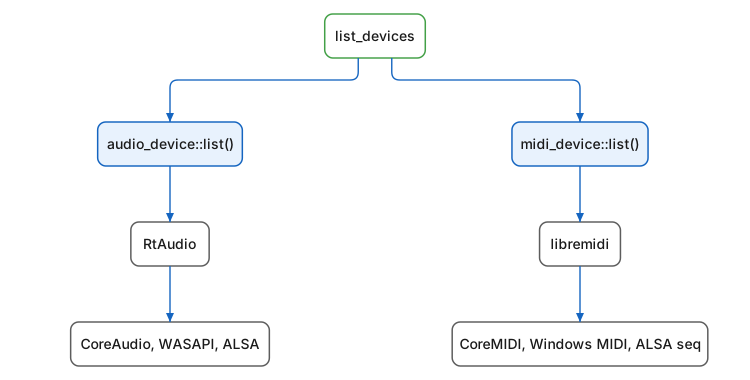
audio_device::list()andmidi_device::list()are q_io’s, and they are the only part of this a program written against Q sees. -
Underneath, RtAudio and libremidi carry the portability, and each asks the system interface named below it.
How It Works
The whole program is two range-for loops:
for (auto const& device : q::audio_device::list())
   // print device.id(), device.name(),
   //       device.input_channels(), device.output_channels()

for (auto const& device : q::midi_device::list())
   // print device.id(), device.name(),
   //       device.num_inputs(), device.num_outputs()
audio_device::list() and midi_device::list() are static members
returning std::vector`s of device descriptors. Underneath, `q_io
delegates to RtAudio and libremidi, which in turn query the native OS
audio and MIDI stacks, so the printed list is exactly what the other
examples (and your own Q applications) can open.
A MIDI port carries messages one way, so each entry is an input or an output, never both. Virtual ports are listed too: a DAW, a sequencer, or the IAC driver on macOS appears next to the hardware.
Typical output:
================================================================================
Available Audio Devices:
id: 1
name: "MacBook Air Microphone"
number of input channels: 1
number of output channels: 0
id: 2
name: "MacBook Air Speakers"
number of input channels: 0
number of output channels: 2
================================================================================
Available MIDI Devices:
id: 0
name: "Code 61 USB MIDI"
number of inputs: 1
number of outputs: 0
Running
cmake -B build
cmake --build build --target example_list_devices
build/example/list_devices/example_list_devices
The example needs no audio files and opens no streams; it only queries.
Components Used
| Component | Role |
|---|---|
Audio device enumeration: id, name, channel counts |
|
MIDI device enumeration: id, name, port counts |
Next: Sine Oscillator